Voicebot Design: How to Build a Voice Interface Enterprises Trust
Voicebot design for enterprises: how to shape voice user interface flows, error recovery, human handoff, CRM integration and testing before you scale.

A voicebot is software that talks with callers in spoken language, and good voicebot design comes down to five decisions: which calls it handles, how it speaks, how it recovers from misunderstanding, when it hands off to a person, and how it connects to the systems that hold customer data. Enterprises that settle these decisions before choosing technology tend to launch faster and to avoid redesign. VOICERAcx supports this approach with no-code agent setup, CRM and telephony integration, and cloud, private cloud or on-premise deployment through its AI Voice Agents offering.
TL;DR
- A voice user interface (VUI) has no screen, so every prompt must be short, clear and say what the caller can do next.
- Limit repeated misunderstandings to three per step, then escalate, and always offer a path to a human.
- Design error recovery in stages, from a simple rephrase to active help.
- Protect customer data in the integration layer: encrypted transport, no sensitive content in logs, and CRM context passed at handoff.
- Test with people first, then integrations, then a limited live pilot, and track technical, conversation and business metrics.
What makes voice design different from chat or IVR design
A voice user interface relies on speech recognition rather than a screen. According to TechTarget’s explanation of VUIs, the auditory nature of the channel is transient: callers cannot scroll back or reread, so designers must state options clearly, give only essential information and coach users on which commands the system understands. The same source notes that third-generation VUIs go beyond the one-turn exchanges typical of a traditional IVR (interactive voice response, the touch-tone phone menu).
Three practical consequences follow for enterprise teams:
- Memory is the constraint. A caller can hold only a few items in mind, so menus and confirmations stay short.
- Open questions replace menus. Instead of reading six options, the agent asks what the caller needs and interprets the answer.
- Voice is one channel among several. Callers who start by phone may continue on WhatsApp, SMS or the web, so the conversation logic should not be rebuilt per channel. For IVR-specific practice, see our guide to human-centered IVR design.
Choose the right interactions first
Not every call belongs to a voicebot at the start. The strongest candidates are high-volume, rule-based and well documented: balance and status inquiries, appointment scheduling, payment reminders, lead qualification and routine follow-ups. Complex, emotionally charged or ambiguous cases are better designed as assisted journeys in which the bot gathers information and a person completes the work.
A simple selection test for each use case:
- Is the intent frequent enough to justify design effort?
- Can the answer be taken from a system of record, such as a CRM or knowledge base, rather than improvised?
- Is the cost of a wrong answer low, or is there a confirmation step that makes it low?
- Is there a clear escalation path if the caller needs a person?
For concrete examples, our articles on appointment scheduling bots and AI lead qualification describe pilots with bounded scope, and knowledge base integration explains how to keep answers grounded in approved content.
Design the conversation: structure, prompts and tone
Google’s Dialogflow CX voice agent guidance divides a conversation into an opening, a multi-turn main sequence and a closing. It recommends a short welcome, open-ended questions that lead to action, and specific repair that gives users the chance to correct themselves.
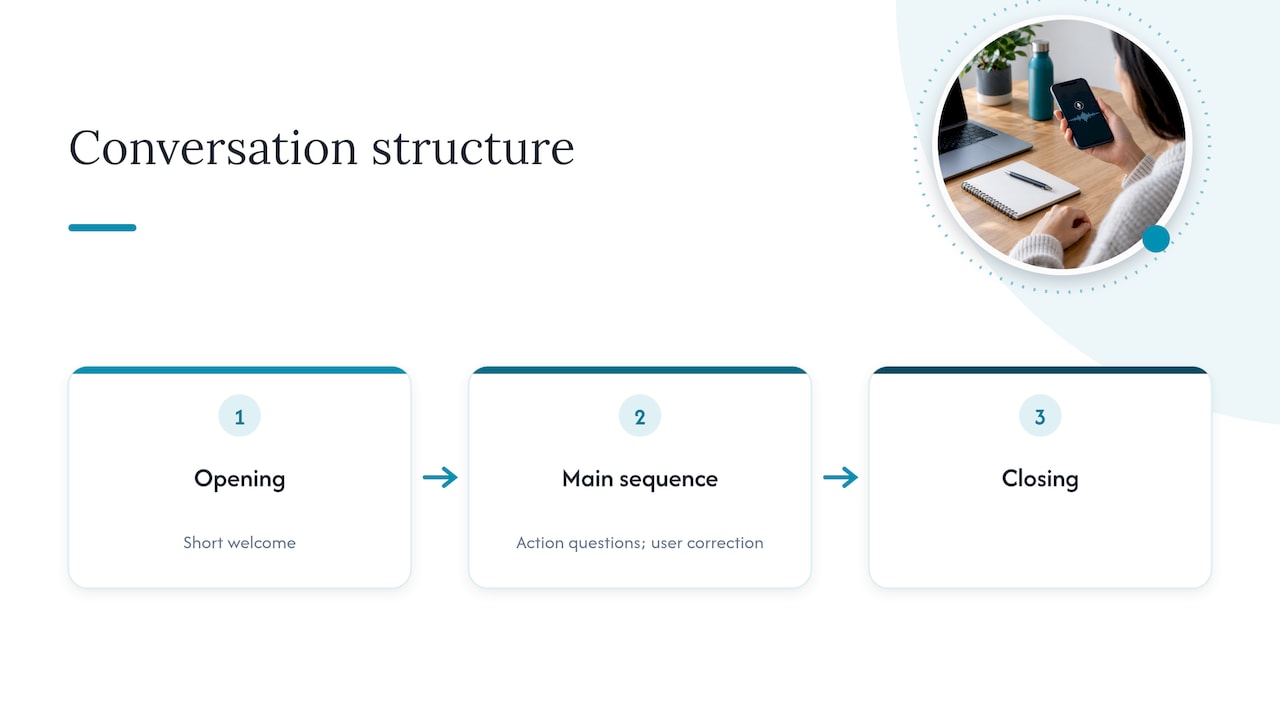
Opening
Identify the service, state that the caller is speaking with an automated agent, and ask one open question. Avoid long legal preambles before the caller has said anything; where recording notices are required, keep them to one sentence.
Main sequence
Ask for one piece of information at a time. Confirm values that carry risk, such as amounts, dates and account identifiers, and skip confirmation for low-risk values. Peer-reviewed research on task-oriented speech dialog systems by Oesterreich and colleagues proposes that prompts respond to errors with natural, friendly phrases and social cues, and that a confirmation strategy guides customers toward the required and missing values.
Closing
Summarize what was done, state what happens next and offer a way to continue on another channel. A closing that sends a text confirmation reduces repeat calls.
Voice and pacing
A review of 336 VUI guidelines in an ACM meta-analysis found that users should be able to control speech speed and voice tone, and that appropriate prosody and low latency help avoid confusion. Responses should be brief, with natural turn-taking.
Error recovery that keeps callers in the conversation
Recognition will fail sometimes because of noise, accents, unusual names or an unexpected request. Design for it deliberately.
Google’s guidance sets a maximum of three no-match or no-input repetitions per page before the caller is escalated to a human agent. On the first no-match it advises rephrasing the question more briefly and adding an apology, so the failure is understood as the system’s. The Oesterreich study describes a multi-stage strategy with two kinds of response: ask strategies let the user rephrase, and solve strategies actively provide solutions. The level of assistance rises when the system keeps misunderstanding, which protects trust.
A workable ladder looks like this:
| Attempt | Design response | Purpose |
|---|---|---|
| First failure | Short apology and a shorter rephrased question | Let the caller self-repair |
| Second failure | Offer examples or a constrained choice | Narrow the answer space |
| Third failure | Offer a text link, a keypad option or transfer to an agent | Avoid a loop |
Each step should be logged so that designers can see where breakdowns concentrate.
Human handoff is part of the design
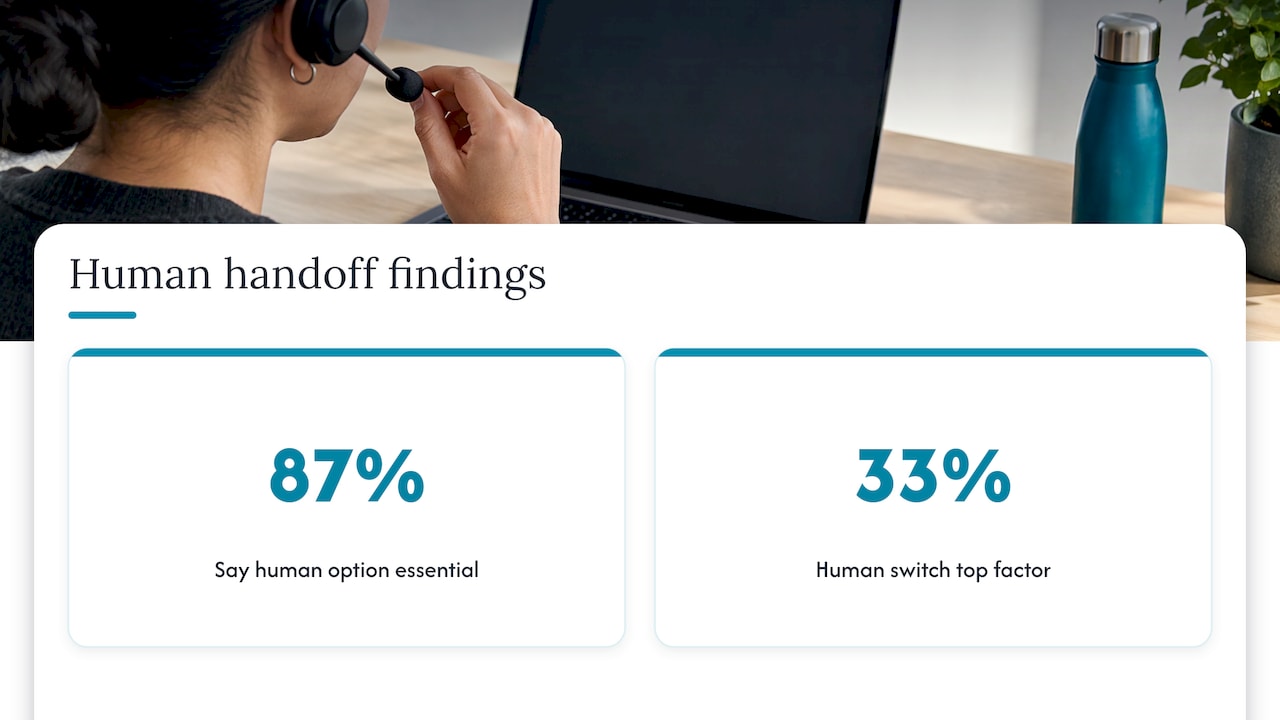
Handoff is a feature, not a failure. A Gartner survey of 3,566 customers (2026) found that 87% say it is essential for companies to offer an option to reach a human agent when using generative AI, and the ability to switch to a human was the top factor, at 33%, in willingness to engage with it. Gartner recommends making clear that human support is available and passing the context and intent of self-service interactions to agents.
In practice, define handoff triggers in advance: explicit request, repeated recognition failure, detected frustration, regulated topics, and high-value or high-risk transactions. Then pass the transcript, the identified intent and the data collected, so the caller never repeats themselves. Our overview of call summarization AI covers how summaries can support this transfer.
Accessibility and diverse speech
A voice interface that works only for typical speech excludes callers and creates risk. The W3C’s cognitive accessibility module on voice systems states that voice systems should be trained and tested with diverse user groups, including non-typical speech patterns, with contingencies for pauses and incorrect terms. It also calls for alternative access, such as a text menu, directed dialog or transfer to a human, for callers whose speech is not recognized, and for fallbacks tested so they reach human help without frustrating loops. Users of augmentative and alternative communication devices may need considerably more time before a timeout.
Design checklist:
- Allow longer pauses before a no-input event.
- Offer a non-voice path for each critical task.
- Let callers slow the speech down or have a prompt repeated.
- Test with accents, background noise, names, numbers and the domain vocabulary that real callers use.
- For multilingual deployments, test each language separately, as explained in our piece on per-language chatbot tests.
Integrate with telephony, CRM and business systems, and protect the data
A voicebot is only as useful as the systems behind it. Two integration patterns matter most. Before the conversation, the caller’s number can trigger a CRM lookup so the agent greets a known customer with account context. After the conversation, the outcome, a short summary and any action items are written back to the record. A CRM integration guide for voice AI describes this pre-call and post-call pattern and targets lookups under 500 milliseconds so the caller does not wait.
For security, ITU-T Recommendation F.748.67 (December 2025) sets requirements for intelligent customer service systems, including:
- Communication contents and sensitive information are not printed.
- Authentication credentials and keys are encrypted before storage.
- Passwords and communication contents never appear in logs or call detail records.
- TLS or HTTPS protects channels that carry personally identifiable information.
- TLS secures signalling and SRTP secures media.
Regulated organizations should also decide where the platform runs. VOICERAcx offers cloud, private cloud and on-premise deployment, so data residency and control requirements can shape the architecture from the start. Further reading: call encryption and contact center security mapped to PCI and NIST.
Prototype, test, pilot and measure
The same CRM guide outlines three phases, which can be adopted as a launch plan:
- Conversation testing. Human role-players walk every intent and escalation path.
- Integration testing. Synthetic caller profiles exercise CRM lookup, context injection, actions, handoff quality and edge cases.
- Live pilot. Route 5 to 10 percent of real call volume for two to three weeks, then expand in stages, for example 10, 25, 50 and 100 percent.
These thresholds come from one vendor-neutral guide and should be treated as starting points to be adjusted to your risk profile. What matters is that each stage has an exit criterion agreed in advance.
Measure at three levels:
- Technical: session success rate, response latency, CRM lookup failure rate.
- Conversation: completion rate, intent success, handoff rate (read as a design diagnostic) and caller sentiment.
- Business: qualified lead rate, cost per successful resolution, and comparison against human-handled calls.
Google’s guidance lists misroute rate, first-call resolution, average handling time, CSAT, number of turns and user churn as quality measures. Review them weekly after launch, and use call analysis to find the prompts that cause most failures. Quality assurance automation shows how full-coverage review replaces sampling of a small share of calls.
How VOICERAcx supports voicebot design
VOICERAcx is an enterprise platform for voice and chat agents that automates conversations across voice, WhatsApp, SMS, email and web, with integration into CRM, telephony and existing business systems. Agents are set up without code, and deployment can be cloud, private cloud or on-premise for organizations that require data control and auditability. Explore AI Voice Agents, AI Chat Agents or Vee Enterprise for large deployments.
Teams that want to start small can review the published plans on the Vee plans page: Free at $0 per month, Basic at $199 per month, Standard at $249 per month, Advance at $399 per month and Pro at $999 per month, plus a Pay As You Go option. Chat sessions are $0.18 each.
Our perspective
Voicebot design is a governance exercise as much as a conversation exercise. The prompts a caller hears are the visible layer; beneath them sit role-based access control, auditability of every decision, and the data boundaries a regulated business must respect.
We design for unified omnichannel automation, so that a customer who begins on a call can continue on WhatsApp or SMS without repeating information. Natural conversation, controlled escalation to human agents and integration with CRM and telephony are treated as one system rather than separate projects.
For regulated sectors, deployment choice is part of the design. Private cloud and on-premise options allow organizations to retain full control of data while still automating service, sales, collections and operational workflows at scale.
Voiceracx
FAQ
What is the difference between a voicebot and an IVR?
A traditional IVR usually relies on keypad menus or fixed phrases and handles one turn at a time. A voicebot interprets natural speech across several turns and can use customer data to personalize the exchange.
When should a voicebot transfer to a human?
Transfer when the caller asks, after three failed recognition attempts on a step, or when the topic is high-risk or regulated. Pass the transcript, intent and collected data so the agent can continue without repeating questions.
How do you make a voicebot accessible?
Offer text or keypad alternatives, allow longer pauses, let callers repeat or slow prompts, and test with diverse speech patterns. Confirm that every fallback reaches a human without looping.
Which metrics show whether the design works?
Track completion rate, intent success, handoff rate, latency, first-call resolution, CSAT and cost per successful resolution. Review the handoff rate and failure points by prompt to find what to redesign.
Sources
- What is a voice user interface (VUI)? | TechTarget
- Voice agent design best practices | Dialogflow CX | Google Cloud
- How can I help you? Design principles for task-oriented speech dialog systems
- What’s The Talk on VUI Guidelines? A Meta-Analysis | ACM
- State of the Customer | Gartner
- Cognitive Accessibility Research Modules: Voice Systems | W3C
- Recommendation ITU-T F.748.67 (12/2025)
- OpenAI Realtime API: Building AI Customer Conversations | NetWebMedia