SMS Chatbots for Product and Engineering: Grounding Handoff Compliance
Design first guide for product and engineering teams building SMS chatbots. Learn grounding, handoff, 10DLC compliance and deployment.
An SMS chatbot is a text-messaging system that automates two-way conversation over the standard phone network, handling support, sales, and operational messages without a human on the other end. Choose a rule-based build when the interaction follows a fixed script, like appointment confirmations or order lookups. Choose an AI-powered, natural-language build when customers need to type free-form questions and get an accurate, grounded answer back.
TL;DR:
- SMS chatbots must be designed to handle variable reply times, message length limits, and user expectations for brief, skimmable messages.
- Using hybrid models that combine menu options with NLP fallback provides a practical balance for most enterprise needs.
- Proper registration, grounding, and consent management are crucial to avoid deliverability issues and comply with carrier and FCC rules.
- Full integration with CRM and ticketing systems ensures smooth handoff to human agents and maintains conversation context across channels.
- Starting with simple, measurable use cases like order updates or appointment confirmations helps validate deployment before scaling.
Why SMS Chatbots Require a Different Design Approach
SMS is not a shrunken version of web chat. It runs on a threaded, asynchronous protocol where a customer might reply in ten seconds or ten hours, and your bot has to hold state gracefully across that gap. There’s no typing indicator, no persistent session window, and no guarantee the user remembers what the last message said.
Two structural constraints shape everything else in the design:
- Message length: Carriers cap single SMS segments at 160 characters; longer messages get split and reassembled through concatenation, which can introduce delivery delays or out-of-order fragments on some devices.
- User expectation for brevity: People read text messages the way they read a notification, not an email. Walls of text get skimmed or ignored.
Despite those constraints, SMS still outperforms nearly every other channel on reach. Global mobile user penetration has climbed steadily for over a decade, and unlike app-based or web-based bots, SMS works on any handset, including feature phones with no data plan. That universality is why enterprises building customer engagement strategies keep SMS in the channel mix even as chat apps proliferate.
Rule-Based, AI, or Hybrid: Choosing the Right Architecture
The architecture decision comes down to how predictable the conversation is and how much variance you can tolerate in the response.
- Rule-based flows map every user input to a predefined path using keywords or numbered menus. They’re fast to build, cheap to run, and fail safely, but they break the moment a customer phrases a request in a way the designer didn’t anticipate.
- Intent-based, NLP-powered bots classify free-text input against a trained model, letting customers type naturally. They need labeled training data, ongoing tuning as language drifts, and monitoring to catch misclassifications before they frustrate users.
- Hybrid bots lead with a menu for common paths (check order status, reschedule, talk to a person) and fall back to NLP only when the customer types something outside the menu. This is the pragmatic default for most enterprise deployments: predictable most of the time, flexible when it needs to be.
Most mature deployments start rule-based, then layer in NLP for the requests that keep breaking the script.
How Does an SMS Chatbot Actually Work?
Every inbound text follows roughly the same lifecycle, and understanding it end-to-end matters before you write a single line of conversation logic.
A customer sends a text to your business number. That number is registered with an SMS gateway or provider such as Twilio, which forwards the message as a webhook payload to your application server. You choose the sender type based on volume and use case: long codes for lower-volume, conversational traffic; short codes for high-throughput marketing or alerts; and toll-free numbers as a middle ground with simpler registration.
On receipt, your backend parses the payload, runs intent detection (keyword match, NLP classifier, or both), and routes the message through your business logic layer. That’s where the real work happens:
- Looking up order status or appointment details in your CRM or order management system
- Deciding whether the query needs a canned response, a dynamic lookup, or escalation
- Rendering a reply that fits SMS constraints and sending it back through the gateway
Handoff and state management are where a lot of otherwise-solid bots fall apart in production. If a customer gets escalated to a human agent, that agent needs the full conversation history, not a blank slate. A well-architected system logs every message and intent classification to a shared context store, so the transition from bot to human (or bot to voice, if the customer calls in later) doesn’t force the customer to repeat themselves. Platforms built for SMS and omnichannel chat typically handle this by keeping conversation state in a unified inbox rather than siloing SMS threads away from web chat or WhatsApp.
Logging also feeds analytics: containment rate, average handle time, and which intents trigger the most fallback-to-human events.
How to Design and Build an SMS Chatbot Step by Step
Building an SMS chatbot that actually holds up in production follows a fairly consistent sequence, whether you’re doing it in-house or through a vendor platform.
- Register your sender identity first. Before writing any conversation logic, register with your carrier program. In the US, that means 10DLC registration for long codes, which directly affects throughput and deliverability. Skipping this step is the single most common reason a working bot suddenly stops delivering messages at scale.
- Write a short welcome message that sets expectations. Open with your brand name, state what the bot can do in one sentence, and include an opt-out instruction. Customers should know within one message whether they’re talking to a bot and what to expect next.
- Design the menu and microcopy for a skimmed read. Keep options to three or four choices, use numbers customers can reply with directly, and avoid jargon that reads fine on a screen but confuses someone glancing at a lock screen notification.
- Map every message to a specific action or API call. Order status, booking changes, and account lookups should each tie to a defined backend function, not a vague “we’ll look into it” response.
- Build fallback rules and confidence thresholds. Set a minimum confidence score for any NLP classification; anything below it should trigger either a clarifying question or immediate handoff to a human agent.
- Test for edge cases before launch. Check concatenated multi-part messages render correctly, verify latency under load, and confirm STOP and HELP keywords work exactly as FCC guidance requires.
Pro Tip: Write your welcome message and your fallback message before you write anything else. If those two messages are clear, the rest of the flow tends to fall into place; if they’re vague, every downstream interaction inherits that confusion.
Adding AI Without Introducing Hallucination Risk
Generative AI extends what an SMS bot can handle, but only when it’s constrained properly. The choice between retrieval-augmented generation (RAG) and straight intent classification depends on the query type: intent classification works well for a finite set of known actions, while RAG earns its complexity when customers ask open-ended questions that need an answer pulled from a knowledge base rather than matched to a script.
The core engineering discipline is grounding. A generative model answering customer questions should pull from a versioned internal knowledge base or FAQ set rather than generating answers from general training data, which is where hallucinated policy details and made-up promises creep in. Practical implementation guidance on grounding AI agents consistently points to the same pattern: ground on company content, and fall back to templated, human-reviewed responses whenever the topic touches billing, legal terms, or anything sensitive.
A few controls matter most in production:
- Set a confidence threshold below which the bot defers to a canned response or live agent, never a guess.
- Version your knowledge sources so a policy update propagates immediately, not after a stale cache expires.
- Keep prompts short and token usage tight. SMS response windows are measured in seconds, and a slow, expensive model call defeats the purpose of a text-based channel built for speed.
What Business Results Should You Expect From SMS Chatbots?
The business case for SMS automation rests on a few concrete use cases that show up in nearly every enterprise deployment: support ticket deflection, appointment confirmations, order status updates, and lead qualification for sales teams working inbound inquiries.
Gartner projects that self-service and live chat will overtake traditional service channels as the leading customer service technologies by 2027, a trend that puts pressure on any team still routing every text-based inquiry to a live queue.
Track these metrics from day one of any pilot:
- Containment rate: the percentage of conversations the bot resolves without human intervention
- Response time: how quickly customers get a first reply, especially outside business hours
- Conversion uplift: for sales and lead-qualification flows, how many SMS conversations turn into booked appointments or completed purchases
- Opt-out rate: a rising opt-out rate is an early warning sign of message fatigue or poor targeting
The ROI usually shows up as reduced average handle time for agents (because the bot pre-qualifies and gathers context before handoff), higher lead conversion from faster response times, and fewer missed service-level agreements during peak volume.
What Are the Legal and Deliverability Risks of SMS Automation?
Deliverability and compliance failures shut down more SMS chatbot projects than bad conversation design does. Carrier registration under 10DLC directly affects whether your messages reach inboxes or get filtered as spam, and sender reputation, built from consistent content and low complaint rates, compounds over time.
Nearly all US carriers now require 10DLC registration for application-to-person messaging, and unregistered senders face throttled throughput or outright blocking, according to CTIA’s carrier program guidance.
Keep these practices in place from launch:
- Honor STOP, UNSUBSCRIBE, and similar opt-out keywords instantly and permanently, per FCC consumer protection rules.
- Never exchange sensitive personal data (full account numbers, health details, payment credentials) directly over SMS; route those interactions to a secure channel instead.
- Keep message content consistent and avoid spam-trigger language, since carriers filter based on content hygiene as much as registration status.
- Manage send rates carefully. Bursting thousands of messages at once, even to opted-in customers, can trigger carrier throttling.
How Do You Integrate SMS Chatbots Into Existing Systems?
An SMS bot that operates in isolation from your CRM and ticketing system loses most of its value the moment a customer needs a human. Integration should preserve full conversation history so an agent picking up an escalated thread sees everything the bot already gathered, not a blank inbox. Mailchimp’s guidance on SMS customer service makes the same point: two-way SMS performs best paired tightly with CRM context, not as a standalone tool.
The stronger architectural pattern is an omnichannel inbox, where SMS threads sit alongside WhatsApp, web chat, and voice conversations for the same customer, rather than living in a separate silo. That structure is also what makes analytics useful: conversation-level metrics and agent-assist signals only tell a complete story when they’re tracking the customer across channels, not just within one.

Enterprise Fit: Security, Deployment, and Omnichannel Reach
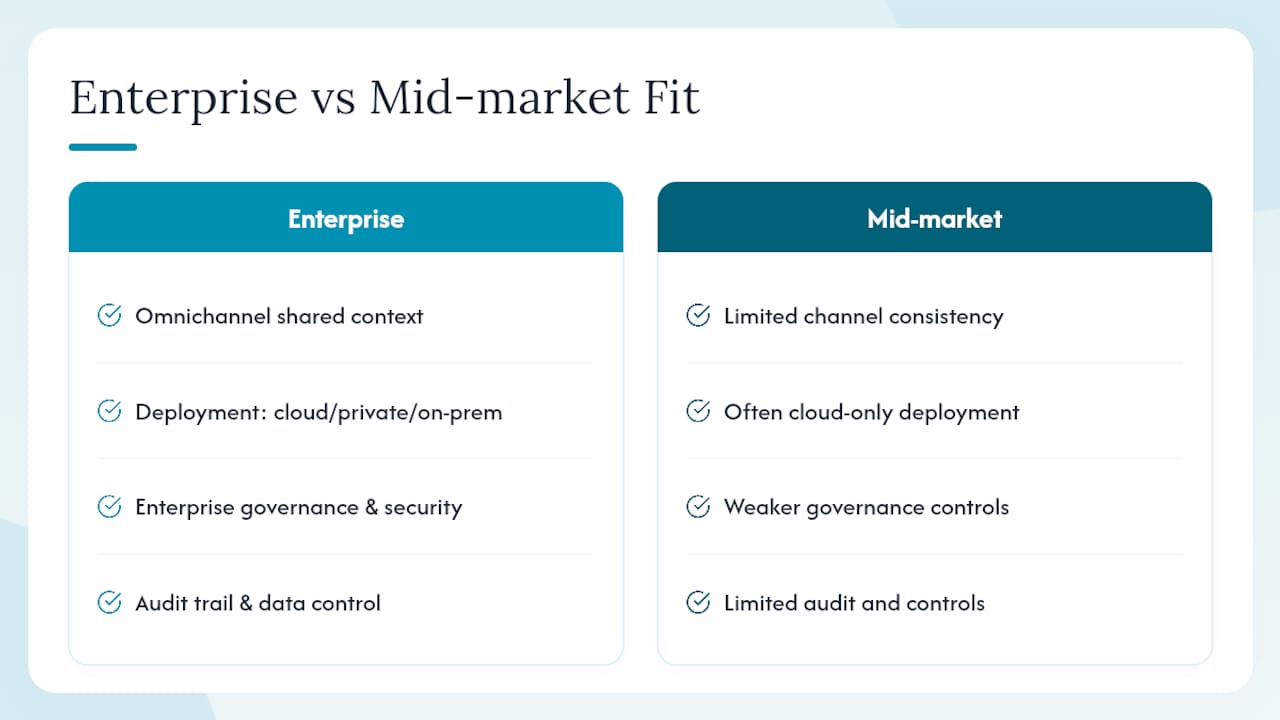
Some platforms build AI voice and chat agents that operate across SMS, WhatsApp, web, and voice from a single orchestration layer, so an SMS conversation and a follow-up phone call share the same customer context rather than starting over. That matters most for regulated industries, where deployment flexibility, cloud, private cloud, or on-premise, isn’t optional. Enterprise-grade governance and security controls give IT and compliance leaders the audit trail and data control that mid-market chatbot tools often lack, particularly when SMS conversations touch account or payment data.
Should You Pilot or Roll Out an SMS Chatbot Enterprise-Wide?
Start with one use case, real volume, and real KPIs. Order status or appointment confirmations work well as first pilots because success is easy to measure. Set clear gates before scaling: containment rate above your target threshold, handoff rate that doesn’t overwhelm agent queues, and an opt-out rate that stays low. The most common scaling mistake is skipping the gate entirely and rolling out five use cases at once before the first one has proven its numbers.
How Voiceracx Helps You Deploy SMS Chatbots at Scale
Building an SMS chatbot that holds up across sender registration, grounding, handoff, and CRM integration is a lot of coordinated engineering for a team that’s also running voice and web channels. Voiceracx is built to remove that coordination burden: one platform handles AI chat agents across SMS, WhatsApp, and web, with the same CRM integrations, handoff logic, and conversation history carrying over whether a customer texts, calls, or messages through the web.
For teams comparing a build-it-yourself SMS stack against a platform approach, the practical difference shows up fastest in how long it takes to get from pilot to production without rebuilding grounding, escalation, and compliance logic for every new channel you add later. If your roadmap includes voice alongside SMS, the same orchestration layer extends to AI voice agents for inbound and outbound calls, so a customer’s SMS history is already visible when they call in. If your team works with implementation partners, agencies like 121 Group also specialize in deploying customer-facing AI automation for enterprises taking this route. Visit the Voiceracx SMS and chat agent page to see deployment options, or contact sales to scope a pilot against your own KPIs.
Sources
- Stop unwanted robocalls and texts | FCC
- 10DLC — CTIA
- Gartner press release — self-service and live chat adoption forecast
- Number of global mobile users since 2010 — Statista
FAQ
Which AI SMS Chatbot Is the Best?
There’s no single best option for every business; the right choice depends on whether you need simple rule-based flows or grounded AI that handles free-text questions across multiple channels. Enterprise teams needing omnichannel continuity between SMS, WhatsApp, and voice often look toward platforms like Voiceracx rather than single-channel point solutions.
What Is an SMS Bot?
An SMS bot is an automated system that sends and receives text messages to handle tasks like answering questions, confirming appointments, or providing order updates without a live agent on every message.
What Is Replacing SMS?
Nothing has replaced SMS as a universal channel; rich messaging protocols and app-based chat (WhatsApp, in-app messaging) have grown alongside it, but SMS still reaches every mobile phone, including feature phones with no data plan.
How Can You Tell If a Text Message Is From a Bot?
Automated texts often arrive instantly regardless of time of day, use consistent formatting or numbered menus, and typically include a bot disclosure or opt-out instruction like “Reply STOP to unsubscribe” near the first message.