150ms Threshold: Real Time Agent Assist for Regulated Contact Centers
Deploy real time agent assist in enterprise contact centers: set latency SLAs, KPI targets, pilot steps, and vendor requirements to secure compliance.

Real-time agent assist gives live agents in-the-moment guidance during a call or chat, using speech-to-text transcription and AI coaching to surface compliance prompts, knowledge, and next-best actions before the agent has to ask. The measurable outcomes are consistent across deployments: lower average handle time, higher compliance adherence, faster new-hire ramp, and more consistent conversion on sales and retention offers. The sections ahead walk through the technical pipeline, the capabilities worth prioritizing, the metrics that actually move, and how Voiceracx approaches deployment for regulated enterprises.
TL;DR:
- Real-time agent assist maintains latency below 150 milliseconds to ensure prompts arrive before the agent responds, avoiding delays in conversation.
- Key capabilities include instant knowledge retrieval, adaptive next-best-action prompts, compliance keyword detection, and cross-channel continuity, with live keyterm updates during calls.
- Successful deployment requires thorough integration setup, security controls, clear training, performance SLAs, and deliberate pilot testing in high-value queues.
- Challenges such as latency creep, alert fatigue, outdated knowledge bases, and fragile integrations must be planned for through post-launch tuning and continuous updates.
- Voiceracx offers flexible deployment options supporting strict compliance sectors and emphasizes onboarding strategies that emphasize collaboration and ongoing system refinement.
What Real-Time Agent Assist Actually Does
Real-time agent assist is not automation, and it is not post-call quality assurance. It sits between the two: a human agent stays in control of the conversation while an AI layer listens, transcribes, and prompts in the background. Automation replaces the agent; agent assist ai makes the agent faster and more consistent. Post-call QA reviews what already happened; real-time agent assist changes what happens next.
The technology works across voice, chat, SMS, and web channels, and the stronger platforms carry context across all of them so an agent picking up a chat thread that started as a phone call isn’t starting from zero. In practice, enterprise teams lean on it for:
- Enforcing regulatory disclosures on debt collection or financial services calls
- Surfacing knowledge base articles the moment a customer names a product or issue
- Recommending next-best-action offers during sales or retention conversations
- Coaching new agents through scripts and objection handling in real time
How the Real-Time Pipeline Works Behind the Scenes
The mechanics matter because they determine whether a prompt shows up while it’s still useful or three seconds after the moment has passed. The pipeline runs through five stages, and any weak link slows the whole chain down.
- Audio capture. The system taps the call through a telephony media stream or SIP trunk, or captures chat text directly.
- Streaming speech-to-text with diarization. Audio converts to text in real time, with speaker labels separating agent from customer. Leading pipelines report median streaming latency around 150 milliseconds, fast enough for a coaching prompt to land before the agent needs to respond.
- Finalized turns feed the reasoning layer. Rather than reacting to raw, unstable partial text, the system waits for a finalized turn before sending it to an LLM or rules engine, which reduces false or hallucinated suggestions.
- Keyterm and compliance detection. Dynamic keyterm lists flag compliance phrases, account numbers, or escalation triggers, and can be updated mid-call as the conversation shifts topic.
- PII redaction, then UI render. Sensitive fields get masked before anything reaches the agent’s screen.
Statistic to watch: a 150ms median transcription latency is the rough threshold separating “real-time” from “noticeably behind the conversation.” Anything meaningfully slower and prompts start arriving after the agent has already improvised an answer.
Key Capabilities Worth Prioritizing in a Vendor
Not every agent assist software vendor builds the same feature set, and the differences show up fastest in high-compliance or high-volume environments. Five capabilities separate the platforms that actually change outcomes from the ones that just add a transcript window to the agent’s screen.
- Instant knowledge retrieval. The system should surface the right knowledge base article the moment a topic is named, not require the agent to search for it.
- Next-best-action prompts. For sales and retention queues, the platform should recommend offers or scripts based on what’s happening in the conversation, not a static playbook.
- Compliance keyword detection. Disclosure reminders and escalation triggers need to fire automatically, covering every interaction rather than a sampled subset.
- Live summarization. Automatic call and chat summaries cut after-call work and reduce the manual note-taking that eats into agent capacity.
- Multichannel continuity and customization. Prompts should carry across channels and support language coverage and rule customization for different business units.
Pro Tip: Ask any vendor demo to show a live keyterm update mid-call, not just a static compliance script. If the system can’t add or adjust a term while a conversation is running, it will lag behind your actual compliance requirements the first time a regulation changes.
How Agent Assist Moves the Metrics That Matter
That shift alone changes what “compliance monitoring” means: it becomes continuous rather than sampled, and every call gets the same scrutiny.
Vendor-reported outcome ranges vary by industry and implementation quality, so treat any specific percentage a vendor quotes as directional, not guaranteed. What’s consistent is the shape of the impact: shorter handle times, fewer compliance misses, faster new-hire ramp, and more consistent conversion on assisted offers.
To measure ROI honestly, set a baseline before rollout and run a phased comparison rather than a company-wide flip:
- Pilot in one or two queues first, holding a comparable queue as a control
- Track average handle time and after-call work separately, since summarization typically improves the second faster than the first
- Watch quality and compliance scores alongside AHT, since a faster call that skips disclosures isn’t actually a win
- Measure time-to-proficiency for new hires against your last several onboarding cohorts
Statistic to watch: automatic post-interaction summarization is documented to cut after-call work and shorten ramp time by reducing the manual documentation new agents otherwise struggle to keep up with.
Deployment Checklist and Pilot Plan for Rolling Out Agent Assist
Rolling out real-time agent assist touches telephony, CRM, security, and training simultaneously, which is why most failed pilots trace back to skipping a prerequisite rather than picking the wrong vendor.
- Confirm integration prerequisites. You need a media stream architecture or SIP integration for voice, CRM and knowledge base connectors, and a working identity and authentication layer before anything else.
- Lock down security and data governance early. Require inline PII redaction that masks sensitive fields before the agent’s screen renders them, documented retention policies, and SOC 2 or BAA documentation if you handle healthcare data.
- Build operational readiness. Put scripts and compliance prompts under version control, define supervisor escalation flows for flagged calls, and build a real training and adoption plan, not just a login email.
- Set performance SLAs in the contract. Specify latency targets, keyterm coverage expectations, and ongoing monitoring and observability requirements, not just uptime.
- Design the pilot deliberately. Choose a high-value queue with clear success criteria, run it long enough to get a real read on the metrics, then expand in phases.
Pro Tip: Treat your keyterm list as a living document tied to supervisor alert rules, not a file you set once at launch. Campaigns shift, regulations change, and a static keyterm list quietly stops catching what it was built to catch within a few months.
For teams evaluating build versus integration partners, working with an AI automation partner experienced in production voice stacks can shorten the prerequisite phase considerably, particularly around media stream architecture.
Enterprise Deployment Patterns: What Voiceracx Supports
Regulated contact centers rarely have the luxury of a single deployment model, and that reality shapes how Voiceracx approaches real-time agent assist for enterprise customers.
- Deployment flexibility. Voiceracx supports cloud, private cloud, and on-premise deployment, which matters directly for organizations bound by data residency rules or internal audit requirements that a standard multi-tenant cloud can’t satisfy.
- Desktop and integration coverage. The Vee Agent desktop connects to CRM systems and telephony infrastructure, extending the same context across voice, WhatsApp, SMS, and web channels so agents aren’t switching tools mid-conversation.
- Governance controls to request. When evaluating vendors, ask specifically for data control documentation, retention policy detail, and compliance artifacts covering how PII redaction is applied before agent-facing display, not just in storage.
Private cloud and on-premise options exist for a reason: they reduce legal exposure and increase auditability compared with standard multi-tenant cloud deployments, which is often the deciding factor for financial services and healthcare buyers.
Challenges and Limitations Worth Planning Around
Real-time agent assist is not a plug-and-play fix, and contact center managers who treat it that way tend to hit the same three walls.
Latency creep under load. A system that performs at 150 milliseconds in a vendor demo can slow meaningfully once it’s handling your actual concurrent call volume, especially during peak hours. Test under realistic load before committing, not just in a sandbox environment.
Alert fatigue. If compliance triggers and knowledge prompts fire too frequently or too generically, agents start tuning them out, which defeats the purpose entirely. Overly broad keyterm lists are a common culprit; specificity matters more than coverage.
Knowledge base decay. Instant knowledge retrieval is only as good as the knowledge base behind it. Agent assist surfaces stale or outdated articles just as fast as accurate ones, so the tool exposes content gaps that were previously hidden by agents quietly working around them.
Integration fragility. Systems built on top of legacy telephony infrastructure can break in subtle ways when call routing changes, and diagnosing “the AI stopped suggesting things” issues often takes longer than expected because the failure point sits between systems rather than inside one.
None of these are reasons to avoid the technology. They’re reasons to budget time for tuning after launch rather than assuming day-one performance is final performance.
Training Agents to Actually Use Real-Time Assist Tools
The gap between agent assist software that gets adopted and agent assist software that gets ignored almost always comes down to training design, not the technology itself.
Start training with the “why” before the “how.” Agents who understand that prompts exist to protect them from compliance mistakes, not to second-guess their judgment, adopt the tool faster than agents handed a feature list.
Run supervised shadow sessions before full rollout. Have agents work live calls with a supervisor watching how they respond to prompts, since the biggest early mistake is agents reading suggested phrasing verbatim instead of using it as a cue.
Build in explicit permission to override. Agents need to know when ignoring a suggestion is the right call, particularly for next-best-action prompts that don’t fit an unusual customer situation. A tool that feels mandatory breeds resentment; one that feels like backup builds trust.
Refresh training every time the keyterm list or script changes. A tool update without a corresponding training touchpoint is where adoption quietly erodes, since agents fall back to old habits when new prompts feel unfamiliar mid-call.
Data Privacy and Security Beyond PII Redaction
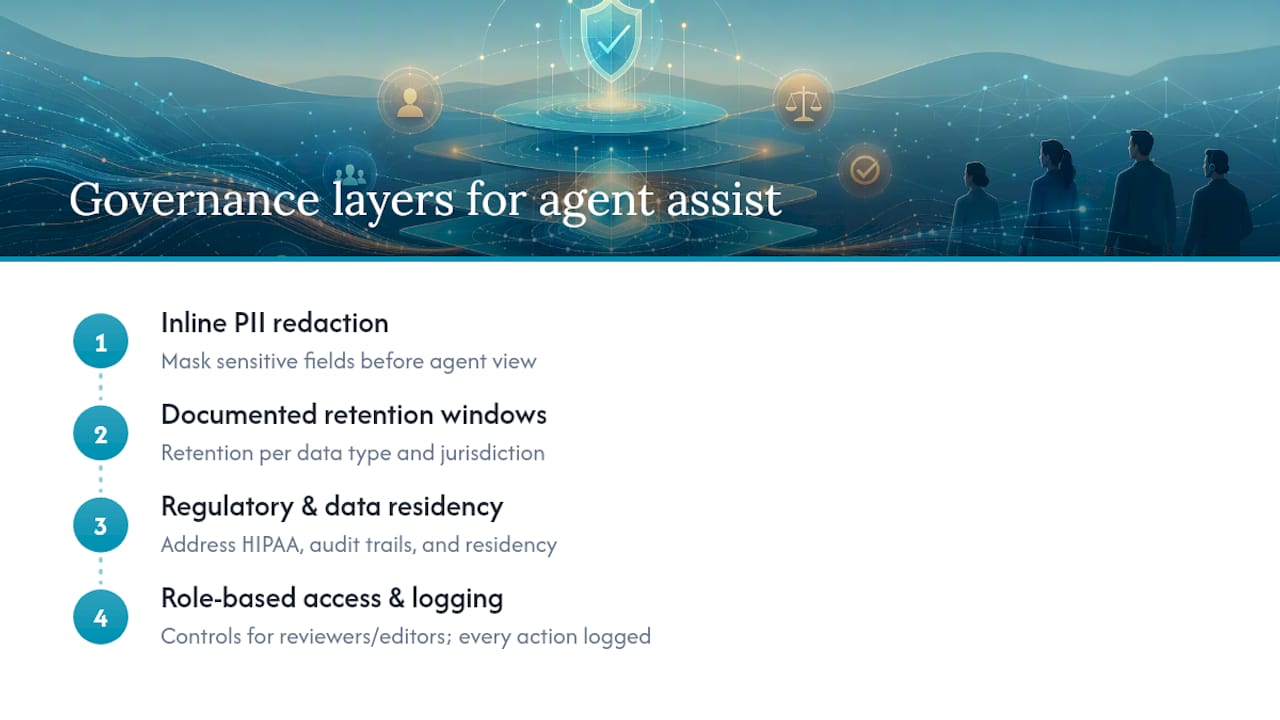
Inline PII redaction handles the most visible risk, masking sensitive fields before they render on an agent’s screen. It doesn’t cover everything a compliance officer needs to sign off on.
Retention policy is the next layer. Transcripts, summaries, and flagged compliance events all need documented retention windows, and those windows often differ by data type and jurisdiction. A summary generated for coaching purposes may need a shorter retention period than a transcript kept for regulatory audit.
Regulatory frameworks vary meaningfully by industry and region, and none of them are satisfied by redaction alone. Healthcare deployments in the United States need to address HIPAA business associate obligations. Financial services organizations typically need audit trails showing which compliance prompts fired on which calls. Organizations operating internationally need to confirm where transcript data physically resides, since data residency rules differ by country and a cloud deployment hosted in one region can create exposure in another.
Access control matters as much as redaction. Role-based access should govern who can review flagged transcripts, who can edit keyterm lists, and who can pull compliance reports, with every action logged for audit purposes. A platform that redacts PII perfectly but lets any supervisor pull unredacted historical transcripts hasn’t actually solved the governance problem, just moved it.
Designing the Agent Interface to Avoid Cognitive Overload
The fastest way to sabotage a real-time agent assist rollout is to hand agents a screen with five simultaneous data streams competing for attention while they’re also trying to listen to a customer.
Prioritize ruthlessly. An agent’s screen during a live call should surface one clear next action, not a scrolling feed of every possible suggestion the system generated. If the interface requires reading paragraphs to find the relevant prompt, it’s already too slow for the moment it’s meant to serve.
Separate urgency visually. Compliance triggers that require an immediate disclosure should look distinctly different from a soft next-best-action suggestion. Color, position, and size all carry meaning, and using the same visual treatment for a mandatory prompt and an optional one trains agents to ignore both.
Keep the transcript secondary, not central. Agents already heard the conversation. A live transcript scrolling in the primary field of view competes for attention that should instead focus on the customer and the coaching prompt.
Test with agents, not just designers. The teams building these interfaces rarely work an eight-hour queue shift. What looks clean in a product review can feel exhausting after two hours of live calls, and the only reliable way to catch that is testing with the agents who’ll use it daily.
Where Real-Time Agent Assist Is Already Proving Out
Industry patterns for real-time agent assist cluster around a few use cases where the compliance or revenue stakes justify the investment.
Financial services and debt collection lean on it hardest for compliance enforcement, since disclosure requirements are strict, regulated, and carry real financial penalties for misses. Continuous, real-time monitoring of all calls replaces the old model of sampling a small fraction of calls for manual review, giving compliance teams broader visibility than before.
Healthcare contact centers use agent assist primarily for knowledge retrieval, since call topics span an enormous range of conditions, insurance questions, and scheduling logistics that no single agent can memorize. Live knowledge base surfacing reduces the number of calls that require a transfer or callback.
Retail and telecom customer service teams lean on next-best-action prompting for retention and upsell scenarios, where a well-timed offer suggestion during a cancellation call can change the outcome of that specific interaction. Sales and collections queues follow a similar pattern, where live coaching on objection handling shortens the gap between a new hire’s first week and full productivity.
What’s Next: Multimodal Inputs and Predictive Analytics
Real-time agent assist is moving past pure voice and text analysis toward systems that read more of the interaction at once.
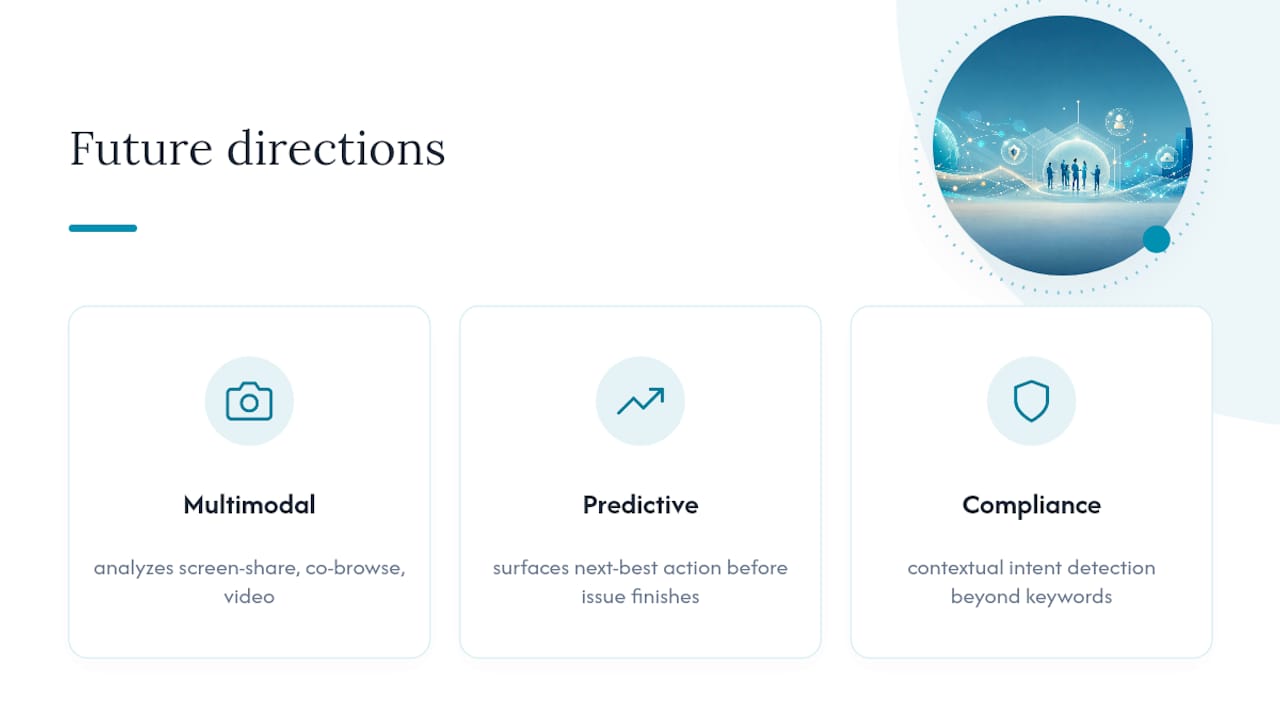
Multimodal inputs are the clearest near-term shift. Chat-based agent assist already analyzes screen shares and co-browsing sessions in some deployments, letting the AI layer see what the customer sees rather than relying solely on what they type or say. Video-based support channels will extend this further, with visual cues feeding into the same suggestion engine that currently relies on audio and text alone.
Predictive analytics is the second major direction. Instead of reacting to what a customer just said, next-generation systems aim to anticipate where a conversation is heading based on patterns from thousands of similar prior interactions, surfacing a next-best-action prompt before the customer has finished raising the issue. That shift, from reactive prompting to predictive prompting, is where most vendor roadmaps are currently focused.
Expect keyterm and compliance detection to grow more contextual rather than purely keyword-based, catching intent even when a customer phrases a regulated topic in an unexpected way. The direction of travel is clear: less static rule matching, more conversational understanding layered on top of the same low-latency transcription foundation that makes real-time coaching possible today.
When to Prioritize Agent Assist Over Full Automation
Full automation makes sense for high-volume, low-complexity interactions where a bot can resolve the request without human judgment. Real-time agent assist earns its place in a different zone entirely: complex, high-value, or compliance-sensitive workflows where a human still needs to be on the call, but that human benefits enormously from a system watching the conversation alongside them.
The practical sequencing that tends to work is pilot first, scale second. Start agent assist in your highest-value or highest-risk queue, whether that’s collections, healthcare enrollment, or high-ticket sales, and validate the metric improvements before expanding. Only after those outcomes hold up should hybrid automation, where bots handle simple cases and route complex ones to assisted agents, enter the conversation.
The rule of thumb is straightforward: if a mistake on that call carries real financial, legal, or reputational risk, keep a human in the loop with real-time assist; if it doesn’t, automation candidates deserve a look first.
— Voiceracx
Evaluate Voiceracx for Real-Time Agent Assist
Voiceracx maps directly to the deployment checklist covered above: cloud, private cloud, and on-premise options for organizations that can’t accept a one-size-fits-all data residency answer, omnichannel continuity through the Vee Agent desktop across voice and digital channels, and governance controls built for the audit questions regulated buyers actually ask.
If your team is weighing a pilot in a compliance-sensitive queue or a high-value sales line, an architecture review is the practical next step. It surfaces integration prerequisites, like media stream architecture and CRM connectors, before you commit to a rollout timeline rather than discovering gaps mid-deployment. Teams already running contact center automation alongside agent assist tend to see the clearest after-call work reductions, since summarization and workflow automation compound each other.
Request a demo or architecture review with Voiceracx to map your current telephony and CRM setup against a real deployment plan.