Enterprise Omnichannel Contact Center: Prove ROI in 6–18 Months
A procurement-ready playbook for enterprise omnichannel contact centers: vendor checklist, rollout steps, Systems of Action buying criteria, and a 6–18...

An omnichannel contact center unifies every customer conversation, voice, chat, email, SMS, and messaging, into one persistent timeline so agents never ask customers to repeat themselves. The result is faster resolution, a single agent-facing view of the full history, and consistent service quality across channels. This guide covers the core capabilities, implementation phases, vendor-evaluation criteria, and governance controls enterprise teams need before committing budget.
TL;DR:
- Session stitching is the core technical challenge, allowing seamless continuity across voice, chat, email, and messaging channels.
- A unified interaction timeline supports consistent agent visibility and eliminates repetitive customer explanations during multi-channel interactions.
- Proper implementation requires phased pilots, validation of session stitching under load, and comprehensive training on a new, cross-channel workflow.
- Full channel support and open APIs are critical, with emphasis on secure deployment models like private cloud or on-premise for regulated industries.
- Key KPIs for success include first contact resolution, transfer rate, handle time, and customer satisfaction scores, tracked over extended rollout periods.
What Is an Omnichannel Contact Center and How Does It Work?
An omnichannel contact center synchronizes every customer touchpoint, voice, email, chat, SMS, and social, into a single unified experience rather than treating each channel as its own silo, according to Salesforce’s definition of the model. That sounds simple. The architecture behind it is not.
The foundation is a unified interaction timeline. Every time a customer switches channels, mid-issue, the system stitches that new session to the prior ones using an identifier, phone number, account ID, or authenticated login, so an agent picking up a chat can see the call from twenty minutes earlier without asking the customer to explain again. Session stitching is the single hardest technical problem in omnichannel design, and it’s the difference that separates a genuine omnichannel deployment from a collection of connected channels.

Above that timeline sits a routing and abstraction layer. Rather than building separate routing logic for voice queues, chat queues, and email queues, mature platforms treat every inbound interaction as an “engagement” object with metadata (intent, priority, customer value, sentiment) and route it through one rules engine. That abstraction is what lets a business apply the same skills-based routing rules to a WhatsApp message that it applies to a phone call.
Several components connect underneath that layer:
- CRM integration, so agents see order history, account status, and prior tickets without toggling screens
- Telephony and unified communications (UC) integration, which the Webex glossary identifies as fundamental to preserving context and agent productivity
- Knowledge base and orchestration tools that surface relevant articles or trigger automated workflows mid-conversation
- API and connector layers, where platforms like MuleSoft demonstrate how reusable connectors keep data mapping consistent as systems change
Deployment model matters just as much as the software stack. Cloud deployment gets a business live fastest and scales elastically, but it means customer data traverses the vendor’s infrastructure. Private cloud isolates that infrastructure for one tenant, a middle path many regulated enterprises choose. On-premise keeps every byte inside the company’s own data center, the slowest to deploy but the tightest on data control. The right choice depends on the regulatory environment more than on feature preference.
Omnichannel vs. Multichannel: What’s the Real Difference?
Multichannel means a business offers several ways to reach it. Omnichannel means those ways are connected. That distinction sounds academic until a customer lives through the alternative.
Picture a customer who emails a billing question, gets no response in two days, calls in frustration, and has to re-explain the entire issue because the call center agent has no visibility into the email thread. That’s multichannel: each channel functions, but none of them talk to each other. Context dies at the channel boundary, and the customer pays the tax in repeated explanations and rising irritation.
An omnichannel setup eliminates that handoff friction. The agent taking the call sees the original email, any bot interaction that followed it, and the account’s full history in one view, so the conversation picks up rather than restarts.
The practical differences show up in a few consistent patterns:
- Context persistence: omnichannel carries history across every channel switch; multichannel resets it at each new channel.
- Customer effort: multichannel forces repetition; omnichannel eliminates it.
- Agent visibility: omnichannel gives one unified queue and timeline; multichannel means separate, disconnected inboxes.
- Reporting: multichannel produces channel-specific metrics that can’t be reconciled into one customer journey view.
Multichannel can be perfectly acceptable for a low-volume operation with simple, single-touch interactions, a small business that only ever gets one email per issue has little to gain from stitching sessions together. Once volume grows or issues routinely span more than one channel, the gap becomes a measurable cost.
Core Features an Omnichannel Platform Should Have
Procurement teams evaluating vendors need a functional checklist, not marketing language. Here’s what separates a genuine omnichannel support platform from a basic multichannel tool with a unified login screen.
-
Intelligent routing with a unified agent desktop. Routing logic should weigh channel, intent, customer value, and agent skill in one engine, then surface the full case in a single desktop screen rather than forcing agents to switch applications per channel.
-
Session stitching across every channel. The platform must reliably link a customer’s chat, call, and email interactions into one timeline using a persistent identifier. This is the capability that makes “omnichannel customer engagement” a reality rather than a slogan.
-
Conversational AI and agent assist. AI agents should handle routine inquiries end-to-end on channels like WhatsApp, SMS, and web chat, while agent-assist tools transcribe, summarize, and suggest responses in real time for human-handled cases. Industry reporting on contact center trends points to automatic summarization and sentiment detection as the fastest-growing agent-assist capabilities.
-
Full channel coverage. Voice, live chat, email, SMS, WhatsApp, and social messaging should all route through the same engine, not bolt-on modules with separate configuration screens. Voiceracx’s AI chat agents illustrate this pattern, handling web, WhatsApp, and SMS conversations through one automation layer rather than three disconnected ones.
-
Open APIs and integration connectors. The platform needs documented APIs and prebuilt connectors for CRM, telephony, and ticketing systems, since custom integration work is where omnichannel projects most often blow past budget and timeline.
Pro Tip: Ask any vendor for their actual API documentation during the sales process, not a slide describing “open architecture.” If they can’t produce it in the first call, budget extra integration time later.
None of these capabilities function in isolation. A platform with excellent AI but weak CRM connectors will still leave agents guessing at customer history. A platform with deep integrations but no AI assist will scale poorly as volume grows. Evaluate the full set together.
Which KPIs Actually Prove Omnichannel Is Working?
Customer satisfaction (CSAT) and Net Promoter Score (NPS) tell you how customers feel, but they lag the operational metrics that predict them. First contact resolution (FCR), average handle time, and transfer rate are the leading indicators worth tracking weekly, not quarterly.
A rising FCR rate combined with falling transfer counts is the clearest sign that context is actually persisting across channels, if agents still transfer customers repeatedly to “someone who can see the full history,” the stitching isn’t working regardless of what the dashboard says about channel coverage.
The metrics worth building into any omnichannel analytics dashboard:
- First contact resolution (FCR), the percentage of issues closed without a follow-up contact
- Average handle time, watched per channel and in aggregate
- Transfer rate, a proxy for how well context actually carries across channels
- CSAT and NPS, tracked at the interaction and relationship level separately
- Cost-to-serve, blended across channels rather than calculated per channel in isolation
- Retention and repeat-contact rate, which connect service quality to revenue outcomes
Why phased pilots matter: Rolling out two or three channels first, rather than all channels simultaneously, reduces risk and creates the operational playbooks needed to scale automation safely, a pattern Dialpad’s implementation guidance recommends for exactly this reason.
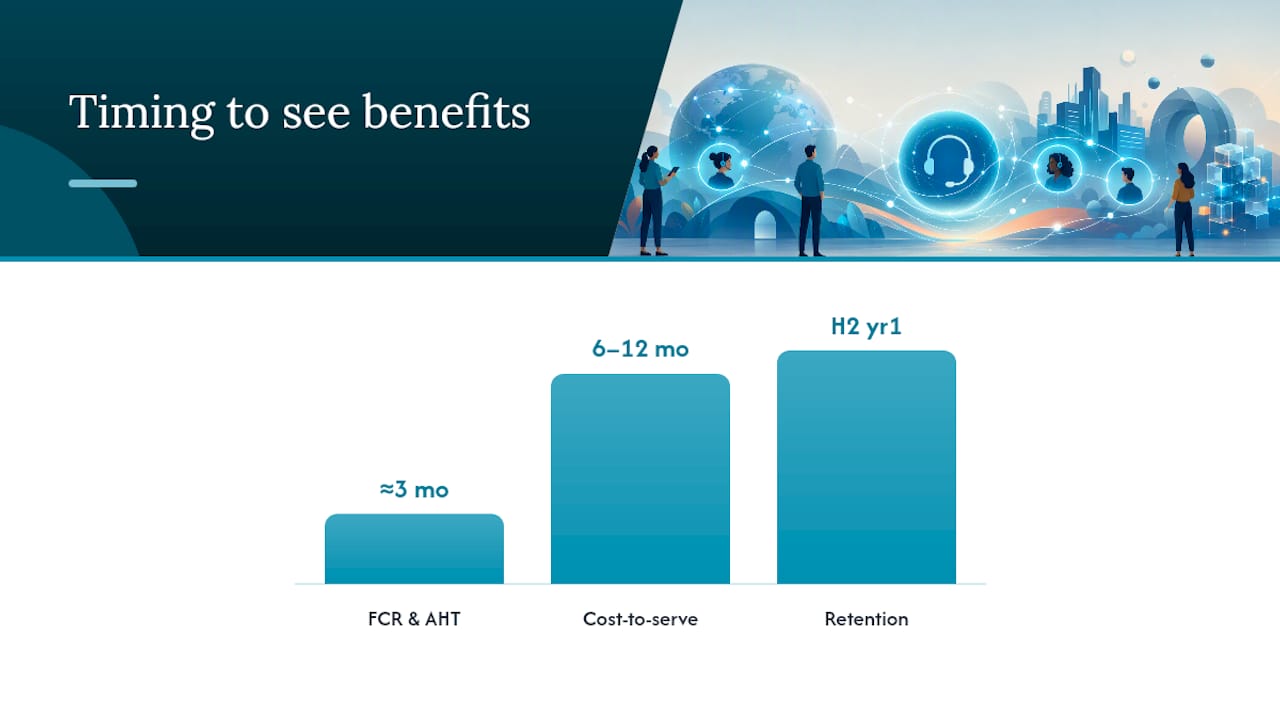
A realistic benefits realization plan spans 6 to 18 months, not a single quarter. The first 90 days typically show handle time and FCR improvements as agents adjust to the unified desktop. Cost-to-serve gains usually take longer, six to twelve months, because they depend on automation volume climbing as AI agents handle a growing share of routine contacts. Retention effects lag furthest behind, often not visible in the data until the second half of year one.
How Do You Roll Out an Omnichannel Contact Center?
A phased rollout beats a big-bang launch on every dimension that matters: risk, budget predictability, and staff adoption. Here’s the sequence that consistently works across enterprise deployments.
-
Audit existing journeys and channels. Map every path a customer currently takes to reach support, and flag where handoffs currently break down. This step alone usually surfaces two or three “context death” points that justify the entire project.
-
Define success metrics before writing a single requirement. Decide upfront which KPIs (FCR, handle time, transfer rate) will prove the rollout worked, so the pilot has a clear pass or fail bar rather than a vague sense of improvement.
-
Pilot two to three channels. Start with the highest-volume, highest-friction channels, usually voice and one digital channel like chat or WhatsApp. Validate that session stitching actually works under real traffic before adding more channels.
-
Validate context stitching under load. A pilot that works in a demo but fails when 500 concurrent sessions hit the system isn’t validated. Test peak-hour scenarios specifically.
-
Build the training and change management plan. Agents accustomed to single-channel queues need structured training on the unified desktop, and supervisors need new coaching frameworks built around cross-channel metrics rather than channel-specific ones.
-
Scale in waves, not all at once. Add channels and automation in planned increments, each with its own validation checkpoint, rather than switching on every remaining channel simultaneously once the pilot succeeds.
-
Institutionalize governance and continuous improvement. Establish a standing review cadence, monthly at minimum, that checks KPI trends against the original success metrics and adjusts routing rules or AI training accordingly.
Pro Tip: Run the pilot long enough to capture at least one full billing or reporting cycle. Rollouts that pilot for two weeks often miss the seasonal or cyclical friction points that cause the biggest customer complaints.
The most common pitfall is skipping the audit step and jumping straight to vendor selection, teams that do this end up buying capability they don’t need while missing the integration work their actual journeys require. The second most common pitfall is training staff on the new tools without retraining supervisors on the new metrics, leaving performance management stuck evaluating agents by outdated, channel-specific standards. Voiceracx’s Centre of Excellence resources address this governance gap directly, giving operations leaders a structured framework for the review cadence that keeps a rollout from drifting after go-live.
What Should Be on Your Vendor Evaluation Checklist?
The ISG Buyers Guide for Contact Centers evaluates providers across interaction routing, agent management, analytics, automation and self-service, workflow automation, integration, and AI support, a useful framework for building your own RFP scoring model rather than relying on vendor claims alone.
Before shortlisting any provider, confirm capability across four dimensions:
- Core functionality: routing sophistication, AI assist maturity, and breadth of native channel support
- Security and compliance: data residency options, encryption standards, and audit logging depth
- Commercial model: whether pricing is seat-based, usage-based, or a hybrid, and how costs scale with volume growth
- Implementation support: partner ecosystem depth, named onboarding resources, and realistic go-live timelines rather than optimistic sales estimates
| Evaluation Area | What to Ask For | Why It Matters |
|---|---|---|
| Deployment flexibility | Cloud, private cloud, and on-premise options | Regulated industries often can’t use pure public cloud |
| AI governance | Model training controls, audit trails for AI decisions | Auditability is now a procurement requirement, not a nice-to-have |
| Integration depth | Prebuilt CRM/UC connectors vs. custom builds | Custom integration is the top cause of budget overruns |
| SLA structure | Uptime guarantees, support response tiers | Determines real operational risk, not just contract language |
Integration breadth, deployment flexibility, and AI governance should weigh more heavily in scoring than a long feature checklist, since a platform with fewer bells and whistles but airtight integration and governance will outperform a feature-rich tool that can’t connect to your actual systems.
What Security and Compliance Controls Should You Require?
Enterprise buyers in regulated industries, financial services, healthcare, insurance, need to treat security architecture as a selection criterion, not a follow-up question after the contract is signed.
Regional data anchoring is the first control to verify. If a business operates across multiple jurisdictions, confirm the platform supports multi-region deployment so customer data stays within the required geographic boundary rather than defaulting to wherever the vendor’s primary data center sits.
The rest of the checklist should cover:
- Encryption in transit and at rest, applied consistently across voice recordings, chat transcripts, and stored metadata
- PII scrubbing or tokenization, so sensitive data doesn’t sit exposed in logs or analytics dashboards
- Defined retention policies, matched to the specific regulatory requirements of the industry, not a generic default
- Identity-provider-driven single sign-on (SSO) and multi-factor authentication (MFA), tied to role-based access control (RBAC) so agents see only what their role requires
- Audit logs exported to a SIEM, giving security teams a real-time view rather than relying on after-the-fact log pulls
- Disaster recovery and failover planning, tested on a schedule, not just documented in a contract
Private cloud and on-premise deployment exist specifically for organizations where these controls carry legal weight, not operational preference. Voiceracx’s enterprise conversational AI platform is built around this reality, offering deployment paths that keep data control inside the regulatory boundary a given industry requires.
What Should Omnichannel Analytics and Reporting Cover?
Analytics in an omnichannel environment has to answer one question the channel-by-channel dashboards can’t: what actually happened across this customer’s entire journey, not just within one interaction?
Journey analytics, built on the same session-stitching data that powers the unified agent timeline, gives that end-to-end visibility. Platforms like Tableau show how visualization tools help teams spot which specific journey moments generate the most friction, then feed that insight directly into routing rule changes or staffing adjustments.
Interaction analytics adds a second layer: transcription, sentiment scoring, and automated summarization applied to every voice call and chat session. This is where Everest Group’s Systems of Action framing becomes concrete, real-time sentiment data lets a system flag a deteriorating conversation and trigger a supervisor alert before the customer disconnects, rather than surfacing the problem in next week’s report.
The distinction between real-time alerts and historical reporting matters operationally:
- Real-time alerts catch problems while there’s still time to intervene, escalations, sentiment drops, SLA breaches in progress
- Historical reporting identifies structural patterns, which channels generate the most repeat contacts, which agent teams need coaching
- Cross channel analytics tie both views together, showing whether a fix applied on one channel actually reduced friction on the others
How Voiceracx Approaches Deployment and Governance
Enterprises rarely choose one deployment model and stay there. A financial services firm might run its digital channels on cloud infrastructure while keeping voice recordings and payment IVR on-premise for audit purposes. Support for cloud, private cloud, and on-premise options lets the deployment model follow the data governance requirement rather than forcing a compromise.
Agentic AI is where the platform’s Systems of Action alignment shows up most directly. Rather than routing every inquiry to a human agent or a static bot script, AI agents built on Voiceracx’s AI voice agents and chat agent products can detect intent, pull context from CRM and telephony integrations, and resolve the interaction end-to-end, escalating only when the case genuinely requires human judgment.
Common integration patterns include:
- CRM systems feeding customer history directly into the AI agent’s context window before a conversation starts
- Telephony and UC platforms passing call metadata that lets routing logic apply the same rules across voice and digital channels
- No-code agent configuration tools that let operations teams adjust conversation flows without engineering tickets for every change
That combination, flexible deployment paired with agentic automation, is what turns a contact center from a system that logs interactions into one that acts on them.
Why Systems of Action Change How You Should Buy
The shift from Systems of Record to Systems of Action isn’t a marketing label. It changes the actual buying criteria. A platform judged only on channel count or seat pricing misses the question that matters now: can it detect intent and act on it without waiting for a human to notice first?
Leaders should automate the highest-volume, lowest-judgment interactions first, password resets, order status, appointment scheduling, and reserve human attention for cases requiring empathy or discretion. Prioritize data quality and modular architecture over any single feature. A platform that can’t ingest clean data will make bad automated decisions no matter how sophisticated its AI claims to be.
— Voiceracx
Where Voiceracx Fits Your Omnichannel Checklist
If you’ve been mapping vendors against the checklist above, unified routing, session stitching, AI agents, private cloud and on-premise options, that is the exact ground such enterprise AI platforms aim to cover. Rather than bolting AI onto a legacy channel switchboard, some platforms start from unified omnichannel automation with natural AI conversation and enterprise-grade governance baked into the architecture, including no-code agent setup and native CRM and telephony integration for regulated sectors that require auditability.
For teams ready to see the routing, session stitching, and deployment options in action, the Cloud Contact Center platform page walks through the core capabilities directly. Enterprises with private cloud or on-premise requirements should start with Vee Enterprise, which is built specifically for regulated deployments where data control isn’t negotiable. If integration and orchestration is the current bottleneck, InteractFlow shows how the platform connects to existing CRM and business systems without a lengthy custom build. For self-serve evaluation, Voiceracx’s Basic, Standard, Advance, and Pro plans offer multiple tiers, including a free option and paid plans that scale with added features and usage, with specific pricing detailed on their site. Request a pilot walkthrough or start an RFP conversation directly through the platform page.
Sources
For deeper research beyond this guide, these sources shaped the frameworks discussed above:
FAQ
What Does Omnichannel Mean in Simple Terms?
Omnichannel means every way a customer can reach a business, phone, chat, email, text, is connected into one system that remembers the full conversation history. It’s the difference between a business that makes you repeat yourself and one that already knows why you’re calling.
What Is Omnichannel Customer Support?
Omnichannel customer support is service delivered across multiple channels with shared context, so an agent handling a chat can see the customer’s prior call or email without asking them to start over. It relies on the same session-stitching and unified timeline architecture described by Salesforce’s omnichannel definition.
What Are the Four C’s of Omnichannel?
Definitions vary across the industry, but the concept generally centers on consistency, context, convenience, and continuity across every channel a customer uses. The core idea in every version is the same: the experience should feel like one relationship, not separate transactions per channel.
Is Omnichannel a CRM?
No. A CRM stores customer records and history, but an omnichannel contact center is the platform that routes conversations, stitches sessions together, and connects to the CRM for context. Integration between the two, as the Webex glossary notes, is what makes the CRM data actually usable during a live interaction.
What Does an Omnichannel Contact Center Cost?
Pricing varies widely by vendor, deployment model, and usage volume. Voiceracx’s self-serve plans run from a free tier up to $999 per month for the Pro plan, with usage-based chat sessions priced at $0.18 per session, while enterprise deployments with private cloud or on-premise requirements are quoted through custom contracts.